
Key Takeaways
- Cross-platform can be a practical starting point for many Australian businesses that need both iOS and Android without maintaining two completely separate codebases.
- Choose native when your app depends on demanding hardware features, advanced graphics or strict platform-specific behaviour.
- Choose classic hybrid when you are building a simple, content-led app and your team already has strong web development skills.
- Budget for ongoing maintenance. Apple and Google regularly update their SDK, store and platform requirements.
- Privacy and accessibility matter across all three approaches. Build security, privacy and accessibility into the project from the beginning.
- Match the technology to the project. Consider your users, features, devices, team skills, budget and long-term plans before choosing an approach.
Choosing between native vs cross platform vs hybrid app development in Australia is a big call. It shapes your budget. It sets your launch date. It decides how users feel about your app. Get it right and you ship faster and spend less on upkeep. Get it wrong and you may rebuild in two years.
You will learn what each approach means, what it costs and where each one fails. You will also get a seven-question checklist. Use it before you brief a developer. If you want a wider view of the build process, see our mobile app development services.
What Is the Difference Between Native, Cross-Platform and Hybrid Apps?
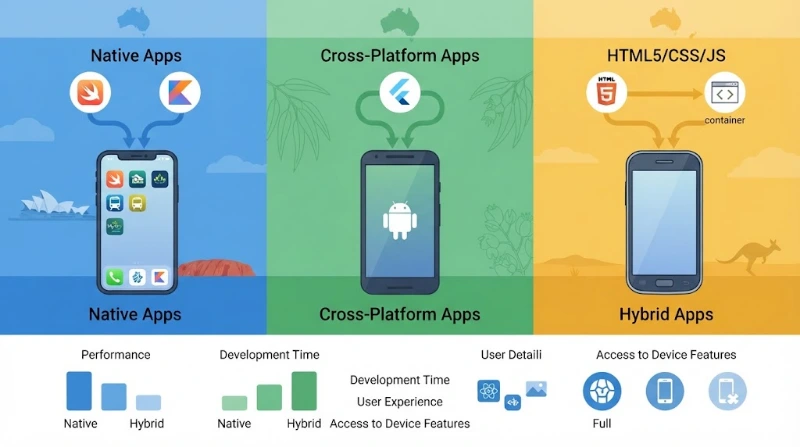
Native apps use each platform's own tools: Swift for iOS and Kotlin for Android. Cross-platform apps share one codebase across both, using frameworks like Flutter or React Native. Hybrid apps wrap a web app inside a native shell, usually through tools like Capacitor. The difference is how much code you share and how the app draws its screens.
Many guides use "hybrid" and "cross-platform" as if they mean the same thing. They do not. The gap matters. It changes performance, cost and long-term risk.
What Is Native App Development?
Native development means building two separate apps. One targets iOS. One targets Android. Each uses the platform's official language and tools. On Apple devices that means Swift and Xcode. On Android it means Kotlin and Android Studio.
Native code talks straight to the operating system. New features arrive on day one. Camera, Bluetooth, biometrics and background tasks all work without extra layers.
The trade-off is effort. You need two codebases. You often need two skill sets. Every feature is built twice. Every fix is tested twice.
What Is Cross-Platform App Development?
Cross-platform development shares most code between iOS and Android. Flutter and React Native lead this space.
Flutter uses the Dart language. According to Flutter's official FAQ, Dart code is compiled ahead of time into native ARM machine code. Flutter also draws its own interface with its Impeller engine. It does not rely on a web view.
React Native uses JavaScript and React. Since version 0.76, its New Architecture is the default. The official React Native announcement explains that this removes the old bridge. JavaScript and native code now talk directly.
Both tools still let you write platform-specific code. That matters for payments, biometrics and Bluetooth.
What Is Hybrid App Development?
A hybrid app is a web app inside a native container. It uses HTML, CSS and JavaScript. A web view shows the interface. Tools such as Capacitor and Ionic package it for the app stores.
Capacitor's documentation describes its approach as a native container for web-first teams. Plugins give access to the camera, storage and other device features.
Hybrid suits teams with strong web skills. It works well for forms, dashboards and content. It struggles with heavy animation and graphics. The web view sets the performance ceiling.
Where Does Kotlin Multiplatform Fit?
There is also a fourth option worth considering: Kotlin Multiplatform (KMP). Kotlin Multiplatform, or KMP, shares code without forcing a shared interface. Google officially supports KMP for sharing business logic between Android and iOS.
Teams can share networking and data rules, then build screens natively. Or they can share the interface too, using Compose Multiplatform. JetBrains announced stable iOS support for Compose Multiplatform in May 2025. The Kotlin documentation says teams can start with a single shared module and grow from there.
KMP suits teams that want native screens without duplicating business logic.
Table 1. The three approaches at a glance
| Feature | Native | Cross-platform | Hybrid |
|---|---|---|---|
| Codebases | Two (iOS and Android) | One shared, plus platform-specific code | One web codebase in a native shell |
| Common tools | Swift, Kotlin | Flutter, React Native | Capacitor, Ionic |
| How screens are drawn | Platform interface toolkits | Own engine (Flutter) or native components (React Native) | A web view |
| Device feature access | Full and immediate | Strong, through plugins or native modules | Through plugins |
| Team skills | Swift and Kotlin specialists | Dart or JavaScript developers | Web developers |
Which Approach Is Faster, Cheaper and Better?
Cross-platform usually ships faster and costs less to build and maintain. Native usually delivers the best performance and the deepest device access. Hybrid is often cheapest to start but has the lowest performance ceiling. No option wins everywhere. The right choice depends on your features, your users and your budget.
Table 2. How the approaches compare on the factors that matter
| Factor | Native | Cross-platform | Hybrid |
|---|---|---|---|
| Performance | Highest | High for most business apps | Adequate for simple apps |
| Build effort | Highest | Lower | Lower |
| Time to market | Slowest | Faster | Fast for web-skilled teams |
| Look and feel | Fully platform-native | Native or custom; needs careful design | Web-like unless heavily styled |
| New OS features | Available immediately | After framework or plugin support | After plugin support |
| Maintenance | Two codebases to update | One main codebase, plus platform fixes | One codebase, plus web view dependencies |
| Best for | Demanding, hardware-heavy apps | Most business and consumer apps | Simple, content-led apps |
We kept this table qualitative on purpose. Public percentage claims vary widely. One 2019 guide says shared code cuts effort by 50 to 80 per cent. Recent Australian vendor pages cite 30 to 40 per cent. Neither figure comes from an independent Australian study. Treat both as vendor estimates.
Expert commentary: A single percentage rarely survives contact with a real scope. Two apps with the same platform choice can differ threefold in cost because of integrations, design depth and compliance work. Ask any vendor to show the assumptions behind their number.
Which Approach Is Best for Australian Businesses?
For most Australian businesses, cross-platform is the best starting point. Flutter or React Native fit typical apps like booking tools, portals, marketplaces and internal apps. Choose native for demanding graphics, augmented reality or deep hardware use. Choose hybrid only for simple, content-led apps built by web-focused teams.
This is our opinion, based on common project shapes. It is guidance, not a rule. Your data and your risks should have the final say.
Table 3. Suggested approach by project type
| Project type | Suggested approach | Why |
|---|---|---|
| MVP or new start-up product | Cross-platform | You can test the idea on both platforms with one team. |
| Customer portal, booking or marketplace app | Cross-platform | Standard flows suit shared code well. |
| Field-staff app with offline forms | Cross-platform, with native modules where needed | Offline sync and device features need careful design, not a separate app. |
| Payments or banking with deep security integration | Native, or cross-platform with audited native modules | It depends on your security requirements and vendor skills. |
| AR, 3D, games, advanced camera or audio | Native | These push the hardware and graphics hardest. |
| Event, brochure or content app | Hybrid (or a progressive web app) | Few features, so a web codebase is enough. |
| Existing native app that needs shared logic | Kotlin Multiplatform | You can share code gradually. |
| Internal app on a fleet of iPhones only | Native iOS | You only need one platform. |
If your project needs a wider software foundation, such as APIs, portals or back-office tools, our custom software development services can sit behind the app.
How Do Australian Users and App Stores Affect Your Choice?
Australian mobile traffic leans towards iPhone, so iOS quality matters. StatCounter's August 2026 data shows iOS at 65.2 per cent of Australian mobile web traffic. Both app stores also force yearly toolchain updates. Every approach needs ongoing maintenance to stay publishable.
Market share depends on the measure. StatCounter counts web traffic, not installed devices. Other sources that count devices show different splits. Check your own analytics before you decide.
What Does an iPhone-Heavy Market Mean for You?
If most of your users hold iPhones, iOS polish comes first. Flutter and React Native can deliver that. Test on real iPhones early and often.
Your audience may differ from the national picture. Care workers, tradies and students may use different devices. Ask your users. Then check your analytics.
What Do Store Rules Mean for Upkeep?
Apple's developer requirements say that from 28 April 2026, uploads must use Xcode 26 and the iOS 26 SDK or later. Google Play's target API policy says new apps and updates must target Android 16 (API level 36) from 31 August 2026.
These rules apply to every app. Native teams update two projects. Cross-platform teams update one project, but they must also wait for their framework and plugins to support the new SDK.
That is why upkeep belongs in the budget from day one. Our guide to mobile app maintenance explains what to plan for.
How Much Does Each Approach Cost in Australia?
No honest fixed price exists, because scope drives cost more than platform choice. Native usually costs the most because you build two apps. Cross-platform often reduces build effort. Hybrid can cost least upfront. Judge the total cost of ownership over three years, not only the first build.
Here are the main cost drivers. They apply to all three approaches.
- Number and depth of features
- Third-party integrations and back-end APIs
- Design complexity and animation
- Testing on real iPhones and Android devices
- Security and privacy work
- Store setup, review and yearly SDK updates
- Monitoring, fixes and new features after launch
Each approach also hides its own costs. Native needs tighter coordination across two teams. Cross-platform needs plugin upkeep and some native work. Hybrid can need performance tuning, and it carries the highest rewrite risk if the app outgrows the web view.
Ask every vendor for a three-year estimate. It should cover build, testing, store updates and support. A cheap first quote can hide an expensive second year.
Some app builds may qualify for the R&D Tax Incentive. The work must involve genuine technical uncertainty. Read the software development guide on business.gov.au. The Government announced changes in the 2026-27 Budget. The Department of Industry page says they start from 1 July 2028. Speak to a tax adviser before you rely on it.
Does Native Really Perform Better Than Cross-Platform in 2026?
Native still leads on raw performance and access to new features. But the gap has narrowed for typical business apps. Flutter compiles to machine code and uses its own renderer. React Native dropped its old bridge. Most users will not notice a difference in forms, lists and dashboards. Graphics-heavy apps are different.
The old case against cross-platform was speed. That case is weaker now. Flutter's documentation says its Dart code is compiled to native machine code and rendered by Impeller. React Native's New Architecture replaced the asynchronous bridge with direct calls.
Native still wins in some places:
- Augmented reality, virtual reality and 3D scenes
- Advanced camera, audio and video processing
- Deep operating system features, such as widgets and watch apps
- Day-one support for new iOS and Android features
- Strict platform look and behaviour
Hybrid apps have a lower ceiling. The web view does the drawing. That is fine for forms and content. It is a poor fit for fast, fluid, gesture-heavy screens.
Expert commentary: A common pain point in cross-platform projects is plugin dependence. A bug inside a third-party plugin can be hard to trace. Pick well-maintained libraries. Keep a budget line for native debugging. This advice applies to Flutter, React Native and hybrid alike.
What Do Privacy, Security and Accessibility Rules Mean for Your App?
Australian privacy and accessibility duties apply to all three approaches. The Privacy Act's Australian Privacy Principles cover how your app collects, uses and secures personal information. Choose your approach on features and team fit. Then build compliance into design, testing and store listings from day one.
How Does the Privacy Act Affect Your App?
The Australian Privacy Principles set the rules for organisations covered by the Privacy Act. The OAIC's APP 1 guidance expects a clear, up-to-date privacy policy. It also covers new automated decision-making duties.
Three changes matter for app owners:
- A statutory tort for serious invasions of privacy has applied since 10 June 2025. Individuals can now sue directly.
- From 10 December 2026, certain organisations will have additional transparency obligations around automated decisions that significantly affect individuals. Whether the requirement applies to your app depends on the organisation and how the automated decision is used.
- The OAIC must register a Children's Online Privacy Code by 10 December 2026. It targets online services likely to be accessed by children.
Many small businesses fall under a turnover exemption, generally $3 million. It has exceptions. Removing it has been proposed, but it is not law. Confirm your position with a lawyer.
Which Approach Is More Secure?
None is secure by default. Practice matters more than framework. Good teams do the same things in all three approaches:
- Encrypt data in transit and at rest
- Keep secrets in the platform keychain or keystore
- Collect only the data you need
- Secure and test every API
- Check third-party libraries for known flaws
- Run a security test before launch
The OWASP Mobile Application Security Verification Standard is a useful checklist. The OAIC's guide to securing personal information also treats mobile apps as part of your ICT security.
Native gives direct access to platform security features. Cross-platform tools can reach them through plugins or native modules. Ask your vendor how they will do it.
What About Accessibility?
The Disability Discrimination Act covers digital goods and services. The Australian Human Rights Commission has issued updated guidelines on equal access to digital goods and services. The W3C's Australian policy page links to them.
WCAG is the usual benchmark. Many teams aim for level AA. Test with VoiceOver on iPhone and TalkBack on Android in every approach. Good design also helps. Our UI/UX design team builds accessibility into wireframes, not after launch.
How Do You Choose? A Seven-Question Checklist
Ask seven questions: which platforms your users use, what device features you need, how demanding your visuals are, your budget, your timeline, your team's skills and your three-year plan. Mostly simple answers point to cross-platform. Mostly demanding answers point to native. Web-only skills and simple screens point to hybrid.
- Which devices do your users hold? Check analytics or survey them. If one platform dominates, native for that platform becomes more attractive.
- Which device features do you need? Standard camera, location and notifications suit cross-platform. Advanced sensors, AR or custom Bluetooth lean native.
- How demanding are your visuals? Forms and lists suit any approach. Heavy animation, 3D and video effects lean native.
- What is your budget for year one and year three? Compare total cost, not the first quote.
- How fast must you launch? A tight deadline favours one shared codebase.
- What does your team know? Web skills suit hybrid or React Native. Swift and Kotlin skills suit native or KMP. Dart skills suit Flutter.
- What is your three-year plan? If you expect big growth or new device features, plan an exit path from day one.
Count your answers. Mostly "standard" answers mean cross-platform is a strong fit. Mostly "demanding" answers mean native deserves a serious look. If your screens are simple and your team is web-only, hybrid may work.
What Mistakes Should You Avoid?
The costliest mistakes are choosing on hype, ignoring upkeep and mixing up hybrid with cross-platform. Others include skipping real-device tests, forgetting accessibility and leaving privacy policies unchanged. Avoid them by planning three years ahead, testing early and confirming you own your source code.
- Choosing on hype. A popular framework is not always the right one for your app.
- Ignoring upkeep. Store rules change yearly. Budget for it.
- Treating hybrid and cross-platform as the same. They have different performance limits.
- Testing only on simulators. Real devices reveal real bugs.
- Leaving accessibility until last. Fixing it later costs more.
- Forgetting your privacy policy. It must match how your app really handles data.
- Not owning your code. Confirm in writing that you own the source code and design assets.
Can You Switch Approaches Later?
Yes, but it is rarely cheap. Moving from hybrid to cross-platform usually means rebuilding screens. Moving to native means rewriting most code. Kotlin Multiplatform allows gradual sharing of code. Plan an exit path early with clean architecture, documented APIs and full source code ownership.
Switching costs depend on how your code is structured. Keep business logic apart from screens. Document your APIs. Keep your data model clean.
KMP is a good example of a gradual path. Its documentation says you can start by sharing one module and expand over time. That lowers the risk of a big-bang rewrite.
What Do Real Decisions Look Like? Three Illustrative Scenarios
These scenarios are hypothetical. They are not client case studies. They show how the checklist works.
A care provider with field staff. Staff record notes on site, often with weak signal. The app needs offline sync, strong privacy controls and both iPhone and Android support. Cross-platform with native modules for secure storage is a sensible fit.
A retailer launching a loyalty app. The app shows offers, scans barcodes and sends notifications. Standard features and a fast launch matter most. Cross-platform is a strong fit.
A start-up building an AR property viewer. The product depends on 3D scenes and camera tracking. Performance is the product. Native is the safer choice.
How Should You Start?
Start with a short discovery phase. Define users, features and risks. Build a clickable prototype. Test it with real users. Then choose the approach with evidence, not opinion. This costs little compared with a rebuild and gives you a clear brief for any developer.
- Write down your top five features and your must-have device features.
- Check your analytics for device and operating system mix.
- Build a clickable prototype and test it with real users.
- Ask two or three vendors for a three-year cost and support plan.
- Pick the approach that fits your answers to the seven questions.
Not sure which approach fits your project? Cognify Digital can help you assess the requirements, platform options, integrations and long-term maintenance before development begins. You can talk to our team when you are ready.
Frequently Asked Questions
Which app development approach is right for an Australian business?
None is best for every project. Cross-platform suits most business apps, because it balances speed, cost and quality. Native suits demanding graphics and deep hardware use. Hybrid suits simple, content-led apps. Match the approach to your features, users, budget and team skills.
Is cross-platform app development cheaper than native in Australia?
Usually it costs less to build, because one shared codebase replaces two. Vendor estimates often quote 30 to 40 per cent savings, but no independent Australian study confirms a figure. Total cost also includes testing, store updates and upkeep, so compare three-year estimates.
What is the difference between hybrid and cross-platform apps?
Hybrid apps run a web app inside a native shell and draw screens with a web view. Cross-platform apps, built with Flutter or React Native, use a shared codebase but draw screens through their own engine or native components. Many guides mix the terms up.
Is Flutter or React Native better for Australian businesses?
Neither wins outright. Flutter uses Dart and its own rendering engine, which suits custom, brand-led interfaces. React Native uses JavaScript and React, which suits teams with web skills. Pick based on your team, your design needs and the plugins your app requires.
Are cross-platform apps slower than native apps?
Native still leads on raw performance. But for typical business apps, such as forms, lists and dashboards, most users will not notice a difference in modern frameworks. Graphics-heavy apps, AR and advanced camera or audio processing are where native still holds a clear advantage.
Do I need separate iOS and Android apps?
Not always. Native development needs two separate apps. Cross-platform and hybrid approaches let one codebase serve both platforms. You still publish through both app stores and test on both platforms. Check your analytics to see whether one platform dominates your audience.
Which approach is best for an MVP?
Cross-platform is usually the best fit for an MVP. One team can test your idea on both iOS and Android quickly. If the MVP is very simple and your team knows the web well, hybrid can work. Choose native only if the core idea needs demanding hardware features.
How do Australian privacy laws affect app development?
If the Privacy Act applies to you, your app must follow the Australian Privacy Principles. That covers collection, use, security and a clear privacy policy. From 10 December 2026, policies must also describe certain automated decisions. Confirm your exact obligations with a lawyer.
Can I switch from hybrid to native later?
Yes, but expect major rework. Moving from a web view to native screens usually means rebuilding the interface and much of the logic. Clean architecture, documented APIs and full source code ownership make any future change cheaper and less risky.
How long does it take to build a mobile app?
It depends on scope. Cognify Digital's published guide suggests about 8 to 12 weeks for a standard MVP and three to six months for complex enterprise apps. Integrations, design depth, testing and store review all affect the timeline, so ask for a milestone plan.
Disclaimer: Some states, data and rules may differ over time. App store requirements, privacy laws, tax incentives and market statistics change often. This article is general information, not legal, tax or technical advice. Check current requirements with the relevant authority or a qualified adviser before you make a decision.

0 Comments