

Key Takeaways
- An MVP tests whether real users want your app, using the smallest build that can prove it — not a stripped-down version of your full product vision.
- CB Insights' ongoing analysis of startup shutdowns consistently ranks a lack of market need as the single most-cited failure reason — exactly what a properly scoped MVP is built to catch early.
- Most mobile app MVPs take roughly 6 to 12 weeks from a locked scope to a working release, though feature count and platform choice shift this.
- Australian founders can access co-funded grants, such as the NSW Government's MVP Ventures program, specifically for MVP-stage commercialisation — a funding angle most MVP guides skip.
Most mobile app ideas fail for a reason that has nothing to do with code quality: nobody validated demand before building the full product. A mobile app MVP development guide should start there, not with a feature list. An MVP, or minimum viable product, is the smallest version of your app that lets real users prove, or disprove, that your idea is worth building further. For Australian founders and product teams, getting this stage right determines whether the next twelve months are spent iterating on a product people want, or quietly shutting down a build nobody asked for. This guide covers what an MVP actually is, how it differs from a prototype, what should and shouldn't make the cut, a realistic build timeline, and funding support available to Australian businesses at this stage. If you're ready to scope a build, our mobile app development team can work through the specifics with you, but the planning below applies whichever development partner you use.
What Is a Mobile App MVP?
A mobile app MVP is the smallest functional version of your app that solves one core problem for a defined group of users, built to test real demand before you invest in a full feature set. It needs to be genuinely usable in production, with real users and real data, not a mockup or a slide deck.
The word "minimum" causes the most confusion. It does not mean a lower-quality app, or your full product with features removed at random. It means the smallest set of features that still delivers the one outcome a user came for, built to production quality, so the feedback you get back is trustworthy.
Why Build an MVP Before a Full Mobile App?
Building an MVP first reduces the cost of being wrong about what users actually want. CB Insights' ongoing analysis of startup post-mortems has repeatedly found a lack of market need among the most-cited reasons startups fail, alongside running out of cash. An MVP is built specifically to surface that risk early, while the cost of changing direction is still low.
Beyond risk reduction, an MVP gives you something a feature list never can: real usage data to bring to investors, a development partner, or your own next planning cycle. You're deciding with evidence, not assumptions.
MVP vs Prototype vs Proof of Concept vs Full Product
These terms get used interchangeably in briefs, and that causes scope confusion before a project even starts. Each serves a different question.
| Factor | Proof of Concept | Prototype | MVP | Full Product |
| Main question answered | Is this technically possible? | Does this flow make sense? | Do real users want this? | How do we scale what works? |
| Used by | Internal team only | Internal team, test users | Real target users | General public |
| Uses real data? | No | Usually no | Yes | Yes |
| Typical goal | De-risk the hardest technical question | Validate UX direction before building | Validate demand and learn from usage | Growth, retention, monetisation |
How Long Does It Take to Build a Mobile App MVP?
Most mobile app MVPs take roughly 6 to 12 weeks from a locked scope to a working release, covering design, build and initial testing. That range moves depending on your feature count, whether you need iOS and Android at launch or one platform first, and whether the backend is built from scratch or assembled from existing services and APIs.
Treat any quoted timeline as tied to a specific, written scope. The most common cause of MVP timelines blowing out isn't development speed, it's scope that keeps growing after the brief is signed off.
What Should Go Into Your MVP?
Use a simple prioritisation method, such as MoSCoW, to separate what the MVP needs from what can wait.
- Must-have: the single core action that delivers your app's main value — the one loop users came for.
- Should-have: features that materially improve that core loop but aren't required to test demand for it.
- Could-have: nice-to-haves that improve polish but teach you nothing new about whether users want the app.
- Won't-have (this release): everything else, explicitly deferred and written down, not just left unspoken.
As a worked example, a two-sided marketplace app MVP typically needs: user sign-up, listing creation, search or browse, and a way to connect a buyer and seller. It typically does not need: in-app payments, ratings and reviews, push notifications, or an admin dashboard with analytics — all genuinely useful, none required to learn whether anyone will use the marketplace at all.
The Mobile App MVP Development Process
Work through these steps in order. Skipping ahead to design or build before step 1 and 2 are locked is the single most common source of MVP scope creep.
1. Define the One Problem Your MVP Solves
Write a single sentence describing the problem and who has it. If you need more than one sentence, the scope is already too broad for a first MVP.
2. Map the Single Core User Journey
Sketch the one path a user takes from opening the app to getting the value they came for. Every screen outside that path is a candidate for the "won't-have" list.
3. Prioritise Features With MoSCoW
Sort every feature idea into must/should/could/won't, using the criteria above. Be willing to defer anything that doesn't sit on the core journey.
4. Choose a Build Approach: Native, Cross-Platform or No-Code
Match the approach to what you're actually testing (see the comparison below) rather than defaulting to whatever a vendor pitches first.
5. Design Just Enough UI
Design the core journey to a usable, on-brand standard. Resist polishing deferred screens before you know users want the core loop at all.
6. Build, Test and Ship to a Limited Audience
Release to a defined early-access group rather than the full App Store and Google Play audience immediately. This keeps feedback manageable and support load predictable.
7. Measure Against a Defined Success Metric Before Scaling
Decide the metric that would tell you the MVP worked before you launch it, not after. Retention after first use is usually a stronger signal than download count alone.
Common Mistakes When Building a Mobile App MVP
- Treating the MVP as a cut-down version of the full product, rather than a focused test of one core assumption.
- Letting scope grow after the brief is signed off, which is the most common cause of blown timelines, not development speed.
- Skipping a defined success metric, so there's no clear answer when deciding whether to continue, pivot or stop.
- Choosing a build approach based on what's trendy rather than what the MVP needs to prove.
- Launching to the full public App Store and Google Play audience before testing with a smaller group first.
- Polishing deferred "could-have" features before validating that anyone wants the "must-have" core loop.
Funding and Support for Mobile App MVPs in Australia
Australian founders building an MVP aren't limited to self-funding or early-stage VC. State government programs specifically target this stage of development.
The NSW Government's MVP Ventures program, administered through business.gov.au offers co-funded grants for NSW companies progressing a product along the Technology Readiness Level (TRL) scale toward commercialisation, with funding tiers that have varied by round. Eligibility criteria, funding amounts and co-contribution requirements change between funding rounds, so confirm current terms directly on business.gov.au before budgeting around a specific figure.
This matters for how you scope the MVP itself: a grant-funded build usually needs clear TRL progression and commercialisation milestones documented from the start, not retrofitted after development begins.
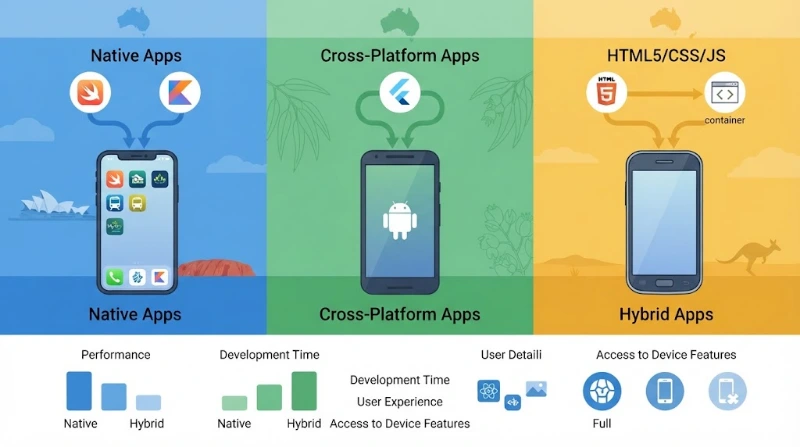
Native, Cross-Platform or No-Code — Which Fits an MVP Build?
The right approach depends on what the MVP needs to prove, not on which technology is most talked about. Native development (Swift for iOS, Kotlin for Android) gives the most direct access to device hardware and typically the smoothest performance, at the cost of maintaining two separate codebases. Cross-platform frameworks, such as React Native or Flutter, let you ship to iOS and Android from one codebase, which usually shortens MVP timelines when deep hardware access isn't the point of the test. No-code and low-code tools can validate very simple core loops fastest of all, but tend to hit limits quickly once the app needs custom logic, scale, or a specific user experience.
As a rule of thumb: if your MVP is testing a hardware-dependent feature (camera processing, continuous background tracking, biometrics), lean native. If it's testing demand for a workflow or content experience across both platforms, cross-platform is usually the faster, cheaper route to a real answer.
A Note on Accuracy
Build timelines, grant amounts, eligibility rules and startup failure statistics referenced in this article reflect published data and programs at the time of writing and can change. Confirm current grant terms on business.gov.au and current timeline or cost estimates with a development partner against your specific scope before budgeting or planning decisions.
Frequently Asked Questions
What does MVP mean in app development?
MVP stands for minimum viable product — the smallest version of an app that still delivers its core value, built to test real user demand before further investment.
How is an MVP different from a prototype?
A prototype validates a design or flow with mocked data, usually with internal staff or test users. An MVP is a real, working release used by actual target users with real data.
How much does it cost to build an MVP app?
Cost depends heavily on feature count, platform choice and whether the backend is built from scratch or assembled from existing services. Get a scoped quote against your specific feature list rather than relying on a generic industry average.
How long does it take to build a mobile app MVP?
Roughly 6 to 12 weeks for most MVPs, from a locked scope to a working release, though this shifts with feature count and platform choice.
Should an MVP launch on iOS and Android at the same time?
Not necessarily. Many teams launch on one platform first to validate demand with a smaller build, then add the second platform once the core loop is proven.
Can I build an MVP with no-code tools?
Yes, for simple core loops. No-code tools can validate demand quickly but tend to hit limits once the app needs custom logic, scale or a specific user experience.
What's the biggest mistake founders make with MVPs?
Treating the MVP as a smaller version of the full product instead of a focused test of one core assumption, which leads to scope creep and an unclear result.
Is funding available for MVP development in Australia?
Yes. State programs such as the NSW Government's MVP Ventures grant co-fund MVP-stage commercialisation for eligible companies. Check current eligibility and funding amounts on business.gov.au.
What metric should I track to know if my MVP worked?
Define this before launch. Retention after first use is usually a stronger signal of real demand than download count alone.
Do I need a full backend for an MVP?
Only enough backend to support your core loop reliably with real data. Additional infrastructure for scale or advanced features can usually wait until after validation.
If you're scoping a mobile app MVP and want a second opinion on what belongs in the first release, our mobile app development team at Cognify Digital can work through your core journey and feature list with you, or you can get in touch directly to talk through your specific build.
0 Comments