

Custom software development helps businesses build applications around their actual operations. It covers everything from identifying business problems to planning, design, development, testing and ongoing support. The right approach can improve workflows, connect existing systems and support future growth. However, successful software starts with clear requirements, not coding. Australian businesses must also consider data protection, security, integrations, project ownership and long-term maintenance before committing to a development project.
If your current tools no longer support your operations, explore Cognify Digital's custom software development services to understand how a tailored solution could address your business requirements.
Key Takeaways
- Custom software is designed around specific business requirements and workflows.
- Businesses should identify their problems before choosing technologies or features.
- The development lifecycle includes discovery, planning, design, coding, testing and deployment.
- Integrations, security and data protection require attention from the beginning.
- Clear ownership, documentation and maintenance arrangements protect long-term value.
- A suitable development partner should understand both business operations and technical requirements.
1. What Is Custom Software Development?
Custom software development is the process of designing, building and maintaining applications for specific business needs. Instead of adapting operations to a generic product, businesses get software designed around their workflows, users and objectives.
These applications can support internal operations, customer interactions, reporting, communication and industry-specific processes.
For example, a distribution company might need a platform that manages orders, inventory, deliveries and customer updates in one place. A standard application may handle some tasks, but a tailored system can connect the complete workflow.
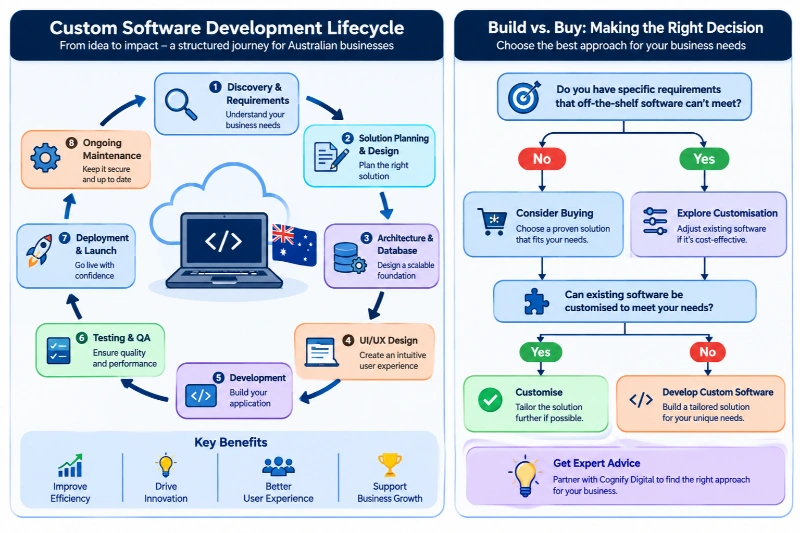
Custom software development vs software customisation
These terms describe different approaches.
| Custom software development | Software customisation |
| Builds an application around specific requirements | Changes an existing application |
| Allows greater control over functionality | Works within the original product's limits |
| Requires a dedicated development process | Uses existing software and configuration |
| Can support unique business workflows | Extends standard product capabilities |
Custom development does not always mean building every component from scratch. Developers can use established frameworks, libraries and third-party services.
The important difference is how the final solution meets the business requirements.
2. When Does a Business Need Custom Software?
A business should consider custom software when existing tools cannot support important workflows efficiently. Repeated manual tasks, disconnected systems and limited reporting can indicate that current processes need attention.
However, building software is not automatically the best answer. Businesses should first assess whether existing tools can solve the problem through configuration or integration.
Common signs include:
- Employees repeatedly enter the same information into different systems.
- Spreadsheets have become difficult to manage.
- Important workflows depend on manual approvals.
- Existing applications cannot support specific business rules.
- Managers struggle to access accurate operational reports.
- Software limitations restrict planned business expansion.
- Teams need better control over application functionality and data.
Example: A growing service business
Consider a service company managing customer enquiries, staff schedules and job updates through separate applications.
Employees manually transfer information between these tools. Managers also struggle to track job progress.
A tailored business application could connect these processes through shared records, automated status updates and role-based access.
This example is illustrative, not a Cognify client case study.
Before investing, compare the cost of existing problems against the proposed solution. Our guide on when to replace spreadsheets with custom software explores this decision in more detail.
3. Types of Custom Software Businesses Can Develop
Custom software can support different business functions. The right application depends on the organisation's users, workflows and operational needs.
| Software type | Main purpose | Example |
| Business management systems | Coordinate daily operations | Job and task management |
| Customer portals | Provide self-service access | Order and booking tracking |
| Employee portals | Support internal activities | Leave and document management |
| Workflow applications | Manage repeatable processes | Approval and reporting systems |
| Enterprise applications | Connect complex operations | Enterprise resource planning |
| CRM platforms | Manage customer relationships | Sales and enquiry tracking |
| Industry-specific software | Support specialised requirements | Healthcare or logistics platforms |
| Web applications | Deliver browser-based functionality | Online business management systems |
Businesses may also combine several application types into one platform.
For example, a customer portal might connect with a CRM, payment gateway and internal management system.
4. What Should Businesses Prepare Before Development?
Businesses should define the problem, users, objectives and essential requirements before development begins. This preparation helps developers understand what the application must achieve and reduces misunderstandings during delivery.
Start with these areas:
Identify the business problem
Describe what currently happens and where the process fails.
Avoid starting with statements such as "We need a dashboard."
Instead, explain what information the dashboard should provide and which decisions it should support.
Define users and stakeholders
Identify everyone who will interact with the application.
Consider:
- Business owners and administrators
- Managers and supervisors
- Employees and operational teams
- Customers and external partners
Each group may require different permissions and features.
Document functional requirements
Functional requirements explain what the software must do.
Examples include:
- Registering and managing users.
- Creating and assigning tasks.
- Processing payments.
- Generating reports.
- Sending notifications.
- Connecting external applications.
Establish non-functional requirements
Non-functional requirements describe how the system should perform.
Consider:
- Response times and performance.
- Expected concurrent users.
- Availability requirements.
- Accessibility.
- Security controls.
- Backup and recovery.
- Future expansion.
Set measurable success criteria
Define how you will evaluate the finished application.
For example:
| Business objective | Possible measurement |
| Reduce manual entry | Number of manual entries per transaction |
| Improve processing | Average time to complete a task |
| Improve reporting | Time required to produce reports |
| Reduce errors | Number of corrected records |
| Improve customer access | Percentage of requests handled through self-service |
These measures give the project a clear purpose.
For a practical starting point, see Cognify's software project brief template.
5. The Custom Software Development Lifecycle
The software development lifecycle (SDLC) provides a structured approach to planning, building, testing and maintaining an application. Each stage has a different purpose and should produce an outcome that the business can review.
5.1 Discovery and requirements analysis
Discovery helps developers understand the business before selecting a technical solution.
The team reviews existing workflows, user needs, operational problems and project constraints.
Typical activities include:
- Stakeholder interviews.
- Workflow mapping.
- User research.
- Requirements gathering.
- Technical feasibility assessment.
- Initial risk identification.
Expected deliverable: A discovery summary, documented requirements and an agreed project direction.
5.2 Solution planning and technical design
The planning stage turns business requirements into a proposed solution.
Developers identify the main application components, required functionality and technical approach.
The team should also decide what belongs in the first release and what can wait.
Expected deliverable: A solution design, prioritised feature list and development roadmap.
5.3 Architecture and database planning
Application architecture defines how different software components work together.
Database planning determines how information is organised, stored and accessed.
Important decisions include:
- Application structure.
- Database selection.
- User authentication.
- Access permissions.
- API connections.
- Hosting requirements.
- Data backup and recovery.
The architecture should reflect expected usage and future requirements.
A monolithic architecture may suit a straightforward application. Microservices may be appropriate when separate components need independent deployment and scaling.
Neither approach is automatically better.
Read Cognify's Microservices vs Monoliths guide for a deeper technical comparison.
5.4 Interface and user experience design
User experience (UX) design focuses on how people interact with the application.
User interface (UI) design covers the visual elements, including layouts, forms, menus and buttons.
Design activities may include:
- User journey mapping.
- Wireframes.
- Interactive prototypes.
- Navigation planning.
- Accessibility considerations.
- Design reviews.
For example, a field employee may need a simple mobile interface to update job status and upload photographs.
A manager may need a separate dashboard to review progress.
Expected deliverable: Approved wireframes, interface designs and user flows.
5.5 Software development
Developers turn the approved designs and requirements into working software.
This stage includes frontend development, backend development, database implementation and integrations.
Many teams use Agile development to divide work into smaller iterations.
Each iteration can include:
- Selected development tasks.
- Code reviews.
- Feature demonstrations.
- Testing.
- Feedback and improvements.
Businesses should review working progress rather than waiting until the final release.
Expected deliverable: Working application components that meet agreed development requirements.
5.6 Testing and quality assurance
Quality assurance (QA) checks whether the application behaves as expected.
Testing should cover more than whether individual buttons work.
Important testing activities include:
| Testing type | What it checks |
| Functional testing | Whether features work correctly |
| Integration testing | Whether connected systems exchange data correctly |
| Performance testing | How the application behaves under expected workloads |
| Security testing | Whether security weaknesses exist |
| Usability testing | Whether users can complete tasks effectively |
| Compatibility testing | Whether the application works across supported devices and browsers |
| User acceptance testing | Whether the solution meets agreed business requirements |
User acceptance testing (UAT) is especially important.
Business representatives should test realistic workflows before approving the release.
Expected deliverable: Test results, resolved defects and business acceptance sign-off.
5.7 Deployment and launch
Deployment moves approved software into its production environment.
The team prepares hosting, configurations, access permissions and release procedures.
Before launch, confirm:
- Production environment readiness.
- Database migration and data validation.
- Domain and security configuration.
- Backup arrangements.
- Monitoring and error reporting.
- User accounts and permissions.
- Rollback and recovery procedures.
A staged rollout can reduce disruption when a large group of users depends on the application.
Expected deliverable: A deployed application, release documentation and an agreed handover.
5.8 Ongoing maintenance and improvement
Software needs attention after launch.
Operating systems, dependencies, integrations and business requirements change over time.
Ongoing maintenance may include:
- Security updates.
- Bug fixes.
- Performance monitoring.
- Database maintenance.
- Backup verification.
- Compatibility updates.
- New features.
- User support.
Businesses should agree on maintenance responsibilities before launch.
A useful support agreement defines response times, issue priorities, maintenance windows and escalation procedures.
6. How Should Businesses Plan Software Integrations?
Software integration connects an application with existing systems through APIs, approved connectors or other data exchange methods.
It allows information to move between applications without repeated manual entry.
For example, a custom order management system could connect with accounting software. When an order reaches an agreed status, the system could send relevant invoice information to the accounting platform.
However, integration planning requires more than identifying the applications involved.
Businesses should establish:
- Which systems need to connect?
- What information must move between them?
- Which system owns each important record?
- How frequently should information synchronise?
- What happens when an API becomes unavailable?
- How will authentication and permissions work?
- How will failed transactions be identified and corrected?
Data mapping is also essential.
For example, one application may identify a customer using an email address. Another may use a unique customer ID.
Developers must define how these records match.
Integration testing should include missing data, duplicate records, expired credentials and temporary service failures.
7. Security, Privacy and Data Protection
Security should be included in software planning, design, development and maintenance. Adding protection only before launch can leave important weaknesses in the application.
Australian businesses should consider the information their systems collect, store, process and share.
Essential software security measures
Depending on the application, these may include:
- Strong authentication and multi-factor authentication.
- Role-based access controls.
- Encryption during transmission and storage.
- Secure API authentication.
- Input validation.
- Activity logging and monitoring.
- Regular backups.
- Vulnerability assessment and security testing.
- Secure management of third-party dependencies.
The Australian Cyber Security Centre's Information Security Manual software development guidance provides detailed recommendations for secure software development.
It covers development environments, secure coding, software dependencies and security testing.
Australian Privacy Act and Australian Privacy Principles
The Privacy Act 1988 and Australian Privacy Principles (APPs) are important considerations when software handles personal information.
However, privacy obligations depend on the organisation, its activities and applicable legal requirements.
Relevant areas include:
- APP 1: Open and transparent management of personal information.
- APP 3: Collection of solicited personal information.
- APP 5: Notification of collection.
- APP 6: Use and disclosure.
- APP 8: Cross-border disclosure.
- APP 11: Security of personal information.
- APP 12: Access to personal information.
- APP 13: Correction of personal information.
The Office of the Australian Information Commissioner (OAIC) provides guidance on these principles.
Businesses should identify applicable obligations before choosing hosting arrangements, integrations and data access policies.
8. How to Make Custom Software Scalable and Maintainable
Scalable software can accommodate changing workloads and business requirements without requiring a complete redesign.
Maintainable software allows developers to understand, update and support the application over time.
These qualities depend on several technical and operational decisions.
Plan for expected growth. Estimate user numbers, transaction volumes and data requirements.
Use modular design where appropriate. Keep application components organised so teams can update specific areas without unnecessary changes elsewhere.
Document important decisions. Record architecture, APIs, database structures and deployment procedures.
Manage technical debt. Review temporary workarounds and outdated components before they become difficult to maintain.
Monitor application performance. Track errors, response times, resource usage and service availability.
Review third-party dependencies. Keep libraries and frameworks updated, and assess known vulnerabilities.
Avoid choosing complex architecture simply because it sounds more advanced. The technical design should match the application's actual requirements.
9. Custom Software Development Costs in Australia
Custom software development costs depend on project scope, complexity, integrations, infrastructure and security requirements.
There is no single price that applies to every business application.
For a detailed Australian pricing discussion, see Cognify's custom software development cost guide.
Important budget factors include:
| Cost factor | Why it matters |
| Project scope | More requirements usually mean more development work |
| Feature complexity | Advanced functionality needs additional planning and testing |
| Integrations | External systems may require API work and additional testing |
| Data migration | Existing records may need cleaning, mapping and validation |
| Security | Sensitive information may require additional controls |
| Infrastructure | Hosting, storage and monitoring create ongoing costs |
| Maintenance | Updates and support continue after launch |
Businesses should also budget for third-party licences, cloud services, payment gateway fees and ongoing support where applicable.
A low initial quote may exclude important work.
Therefore, compare proposals based on the same requirements and deliverables.
10. Common Risks in Custom Software Projects
Software projects can face operational, technical and commercial risks.
Identifying them early makes project planning more reliable.
| Common risk | Practical way to reduce it |
| Unclear requirements | Document workflows and acceptance criteria |
| Expanding project scope | Use agreed priorities and change-control procedures |
| Unrealistic deadlines | Plan around complexity and dependencies |
| Poor communication | Set regular progress reviews |
| Limited user involvement | Include actual end users in discovery and UAT |
| Integration problems | Validate APIs and data requirements early |
| Missing documentation | Include documentation in project deliverables |
| Unclear ownership | Agree source-code and IP terms in writing |
| No post-launch plan | Define maintenance and support responsibilities |
One important distinction is between a feature being completed and a business outcome being achieved.
A system may pass functional testing but still fail to improve the process it was designed to support.
That is why businesses should define measurable success criteria before development begins.
11. How to Choose a Custom Software Development Partner in Australia
Choosing a development partner requires more than comparing prices and technology stacks.
Businesses should assess whether a provider understands their requirements and can support the application beyond its initial release.
Use these evaluation points:
Relevant experience: Review projects involving similar workflows, integrations or application types.
Discovery process: Ask how the team gathers requirements and identifies technical risks.
Technical capability: Understand its experience with application architecture, databases, APIs and security.
Communication: Confirm who manages the project and how progress is reported.
Quality assurance: Ask about testing procedures, defect management and UAT.
Security practices: Discuss access controls, development environments and vulnerability testing.
Ownership: Confirm who owns the source code, documentation and intellectual property.
Handover: Ask whether another qualified development team could maintain the application.
Ongoing support: Understand maintenance arrangements, response times and additional costs.
Questions to ask before signing an agreement
- What deliverables will each project milestone include?
- How will requirements and scope changes be managed?
- Who will work on the project?
- How often will we review working software?
- What testing is included?
- Who owns the source code and project documentation?
- Are hosting and third-party fees included?
- What happens if the project needs additional work?
- What support is available after launch?
- How will the team handle a serious production issue?
Ask for written answers.
Also, ensure the agreement covers payment milestones, acceptance criteria, responsibilities and handover terms.
12. Conclusion: Planning a Successful Custom Software Project
Successful custom software starts with understanding a business problem.
The development team must then translate that problem into clear requirements, a suitable technical design and a practical delivery plan.
Integrations, security, testing and ongoing maintenance all contribute to the final result.
Australian businesses should also consider applicable privacy obligations and agree on ownership before development begins.
The best solution is not necessarily the one with the most features or the newest technology. It is the one that solves the right problem and remains useful as the business changes.
If you are planning a new application or replacing an existing system, contact Cognify Digital to discuss your requirements and explore a suitable development approach.
Frequently Asked Questions
1. What is custom software development?
Custom software development is the process of creating applications for specific business requirements. It allows organisations to build functionality around their workflows, users and operational objectives.
2. How does the custom software development process work?
The process usually includes discovery, requirements analysis, solution design, architecture, development, testing, deployment and ongoing maintenance. The exact stages depend on project complexity.
3. How long does custom software development take?
Timelines depend on the application scope, integrations, complexity and team capacity. A small internal tool may take considerably less time than a large enterprise platform. A realistic estimate requires defined requirements.
4. Can custom software integrate with existing business systems?
Yes. Developers can connect custom applications with existing systems through APIs, approved connectors and other integration methods. Compatibility, permissions and data structures must be assessed first.
5. Is custom software suitable for small businesses?
Yes, when existing tools cannot support important business processes. However, small businesses should compare development costs against configuring existing software or using suitable low-code solutions.
6. Who owns custom software after development?
Ownership depends on the development agreement and applicable intellectual property arrangements. Businesses should clearly document source-code ownership, licensing, documentation rights and third-party component restrictions.
7. Can custom software scale as a business grows?
Yes, if the application is designed with suitable architecture, infrastructure and maintainability in mind. Future growth may still require additional development and infrastructure changes.
8. What should a business prepare before starting a software project?
Prepare a description of the business problem, users, workflows, essential features, existing systems, integration needs, budget range and expected outcomes. These details help developers assess the project.
9. What is the difference between functional and non-functional requirements?
Functional requirements describe what software must do, such as processing orders or generating reports. Non-functional requirements describe how it should perform, including security, availability, accessibility and response times.
10. Why is software maintenance important after launch?
Maintenance keeps applications secure, reliable and compatible with changing technologies. It also helps businesses address defects, update dependencies and introduce new features as requirements change.
Disclaimer: Software development costs, technical standards, privacy obligations and regulatory requirements may change over time. Requirements can also differ between Australian states and territories, industries and project types. Verify current policies and applicable obligations before making business or legal decisions.



0 Comments