

Key Takeaways
Mobile app development involves much more than building screens for smartphones. Australian businesses need to consider product strategy, user experience, backend systems, integrations, security, development costs and ongoing maintenance. The right approach depends on the problem the application solves, its users and its technical requirements. Native, cross-platform, hybrid and progressive web applications each serve different purposes. A successful project starts with clear requirements, validates its core features, plans for privacy and security, and accounts for the full cost of operating the application after launch.
Why Mobile App Development Matters for Australian Businesses
A business might have a successful website, a loyal customer base and an efficient team. Yet some processes still create unnecessary work.
Customers might need to call to make bookings. Employees might record jobs manually. Managers might struggle to access information while travelling between locations. Different departments might use disconnected software.
These problems can create opportunities for a dedicated mobile application.
Mobile app development in Australia gives businesses an opportunity to create digital products around their customers, employees and operational requirements. However, developing an app is a significant investment. Choosing the wrong technology or building unnecessary features can increase costs without improving business performance.
The first decision should not be whether to use Flutter, React Native or native development. Instead, identify the problem that needs solving.
For example, a field service company might need an application that allows technicians to receive jobs, upload photographs, record customer signatures and update job statuses. A retailer might need customer accounts, order tracking and loyalty features.
Both businesses need mobile applications, but their technical requirements are different.
If you are evaluating a new application, explore Cognify Digital's mobile app development services in Australia to understand how product design, mobile engineering, integrations and ongoing support fit into a complete development project.
This guide explains the process from initial planning to launch. It also covers Australian development costs, technology choices, privacy considerations and common project risks.
1. What Is Mobile App Development?
Mobile app development is the process of planning, designing, building, testing and maintaining software applications for mobile devices.
These applications can run on smartphones and tablets. They may also connect to cloud platforms, business databases, payment systems and external services.
A business application usually contains several connected components:
- Mobile frontend: The screens, buttons, menus and features users interact with.
- Backend: The server-side logic that processes requests and manages business operations.
- Database: The system that stores user accounts, transactions, documents and other information.
- APIs: Connections that allow the application to communicate with other systems.
- Admin dashboard: A web interface that allows authorised staff to manage application data and activities.
- Cloud infrastructure: The services that host application backends, databases and supporting systems.
Not every application needs all these components. Their requirements depend on the product.
Mobile app development vs mobile website development
A mobile-friendly website and a mobile application are not the same thing.
A responsive website adjusts its layout to different screen sizes. Users can access it through a browser without installing an application.
A mobile app is designed specifically for mobile operating systems or supported app environments. Depending on its architecture, it can provide deeper integration with device features.
| Factor | Mobile website | Mobile application |
|---|---|---|
| Access | Browser | Installed app or supported web app |
| Installation | Not normally required | Required for native apps |
| Updates | Published on the website | Released through an update process |
| Device features | Browser-dependent access | Broader device integration |
| Offline functionality | Limited or PWA-dependent | Can be designed into the app |
| Distribution | Website URL | App stores or alternative distribution |
| User engagement | Browser-based | Push notifications and app-based interactions |
Consider a restaurant.
Its website might display menus, opening hours and contact information. However, a dedicated application could support customer accounts, loyalty points, saved orders and personalised notifications.
A website may be sufficient for the first requirement. The additional application becomes useful when customers need ongoing functionality.
When should a business build an app?
Consider an application when customers or employees need repeated access to specific workflows, device features, personalised services or secure account-based functionality.
If the same result can be achieved through a responsive website, an application may introduce unnecessary development and maintenance costs.
2. Types of Mobile Applications
The technology selected for an application influences development effort, performance, device access and long-term maintenance.
There are four common approaches worth understanding.
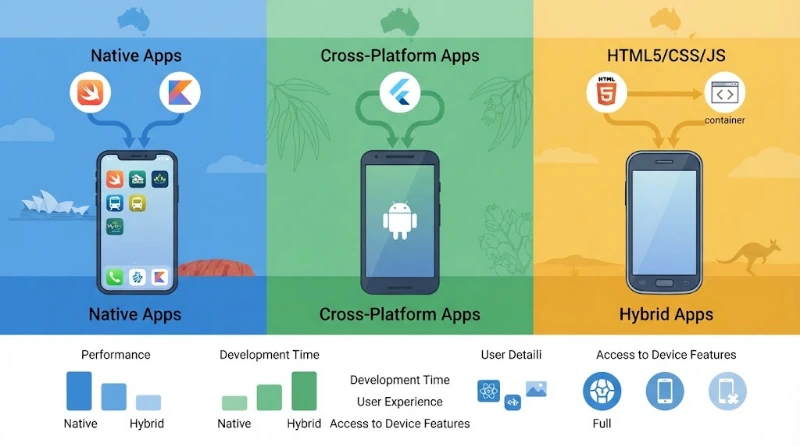
2.1 Native mobile applications
Native applications are developed specifically for an operating system.
For iOS, developers commonly use Swift and Apple's development frameworks. Android applications commonly use Kotlin and Android development tools.
Native development allows teams to work directly with platform-specific capabilities.
Advantages
- Direct access to operating system features.
- Strong integration with device hardware.
- Platform-specific interface conventions.
- Greater control over performance optimisation.
- Flexibility for complex device interactions.
Limitations
- Separate iOS and Android development may be necessary.
- Two codebases can increase maintenance work.
- Specialist platform knowledge is required.
- Development costs can increase when both platforms need equivalent features.
When is native development suitable?
Consider native development when the application depends heavily on specialised device capabilities or platform-specific performance.
Examples include advanced camera applications, complex Bluetooth integrations, specialised media processing and applications with demanding hardware requirements.
A business does not automatically need native development simply because it wants an iOS and Android application.
2.2 Cross-platform applications
Cross-platform development allows developers to build applications for multiple operating systems using a shared codebase.
Two widely used frameworks are Flutter and React Native.
Flutter uses Dart and provides its own UI rendering approach. React Native uses JavaScript or TypeScript and connects application interfaces with native platform capabilities.
Advantages
- Shared application logic across platforms.
- Reduced duplication of development work.
- More consistent feature implementation.
- Easier coordination of many common updates.
- Suitable for many business applications.
Limitations
- Some features still require platform-specific code.
- Third-party package compatibility needs attention.
- Complex native integrations may require specialist work.
- Framework and dependency updates need ongoing management.
Cross-platform development can be suitable for booking platforms, customer portals, delivery applications, marketplaces and business management tools.
However, a shared codebase does not guarantee that every feature will behave identically across devices. Testing remains essential.
2.3 Hybrid mobile applications
Hybrid applications combine web technologies with a native application container.
Developers commonly use HTML, CSS and JavaScript to build the interface. A native wrapper provides access to selected device features through plugins or platform bridges.
Advantages
- Web development skills can be reused.
- A shared interface can support multiple platforms.
- Some applications can be developed with less duplicated work.
- Useful for content-focused or relatively straightforward products.
Limitations
- Performance depends on implementation and device capabilities.
- Complex animations may require additional optimisation.
- Plugin quality can affect reliability.
- Native integrations may introduce extra development work.
Hybrid development can suit internal business tools, content-based applications and relatively simple workflows.
It is important to assess the actual requirements rather than assuming hybrid development is always cheaper.
2.4 Progressive Web Applications (PWAs)
A Progressive Web App is a web application that uses modern browser capabilities to provide an app-like experience.
Users can access it through a browser and, on supported devices, install it on their home screens.
PWAs can support features such as caching, offline experiences and notifications. However, availability and behaviour vary by browser and operating system.
Advantages
- No traditional app store installation is required.
- Users can access the application through a URL.
- One web application can support multiple device types.
- Updates can be deployed through the web platform.
- Suitable for many customer portals and lightweight business tools.
Limitations
- Device feature access varies across platforms.
- Some operating system integrations are restricted.
- Browser capabilities influence the experience.
- It may not meet requirements for applications needing extensive native functionality.
A PWA may be a sensible first step for a business that needs mobile access but does not require a full native application.
3. How to Choose the Right Mobile App Development Approach
There is no universally best mobile development technology. The right choice depends on the application's purpose, technical requirements and expected future development.
The following comparison provides a starting point.
| Decision factor | Native | Cross-platform | Hybrid |
|---|---|---|---|
| Performance control | High | Strong for many applications | Implementation-dependent |
| Codebase | Separate platform code | Largely shared | Shared web code |
| Device integration | Extensive | Strong, framework-dependent | Plugin-dependent |
| Two-platform development | More duplicated work | Less duplicated work | Shared implementation |
| Custom interfaces | Extensive control | Strong flexibility | Web-based interface |
| Maintenance | Platform-specific | Shared and platform-specific | Web and plugin dependencies |
| Typical use | Complex device features | Business and customer apps | Simpler web-oriented apps |
Before selecting a technology, evaluate these six areas.
Business objectives
Start by defining the business outcome.
Do you want to:
- Reduce manual administrative work?
- Improve customer self-service?
- Create a subscription-based digital product?
- Manage field employees?
- Support online transactions?
- Connect customers with service providers?
A clear objective helps developers identify the necessary functionality.
For example, a logistics company may need live delivery updates, driver task management and proof of delivery. These requirements influence the architecture more than the choice of programming language.
Target audience and devices
Understand who will use the application.
Consider:
- Whether users primarily use iPhones or Android devices.
- Whether they use older smartphones.
- Whether they have reliable internet access.
- Whether they need accessibility features.
- Whether employees use company-managed devices.
- Whether customers expect tablet support.
A business serving a broad customer base may need both iOS and Android support.
An internal application might initially support only the devices used by employees.
Device features
Some applications need access to hardware and operating system capabilities.
Examples include:
- GPS and location services.
- Cameras and document scanning.
- Bluetooth devices.
- Biometric authentication.
- Background processing.
- Push notifications.
- Offline data storage.
List these requirements before selecting a framework.
Budget and delivery expectations
Native development for two platforms can involve more duplicated work. Cross-platform development may reduce that duplication.
However, complex integrations, custom interfaces and backend systems can still require substantial effort.
Compare the total project scope rather than framework prices alone.
Long-term maintenance
Think beyond the first release.
Who will update the application? Who will maintain its APIs? What happens when a framework changes or an operating system introduces new requirements?
A technology choice should be sustainable for the people maintaining it.
Scalability
Consider whether the application may eventually support:
- More customers.
- Additional user roles.
- More transactions.
- Multiple business locations.
- New integrations.
- Additional reporting features.
- International markets.
Scalability does not mean building an enterprise architecture immediately. It means avoiding technical decisions that make expected growth unnecessarily difficult.
Practical recommendation: Ask your development partner to explain why a particular technology suits your requirements. A useful recommendation should include trade-offs, not simply promote one framework.
For a deeper comparison, read Native vs Cross-Platform vs Hybrid Apps: An Australian Guide.
4. The Mobile App Development Process: Eight Essential Stages
A successful application requires more than writing code. Each stage should produce something that can be reviewed before the project moves forward.
Step 1: Define business goals and requirements
The first stage is understanding what the application needs to achieve.
Avoid starting with a long list of features. Start with the problem.
Ask:
- Who experiences the problem?
- How do they currently solve it?
- What makes the current process difficult?
- What should the application improve?
- How will the business measure success?
Consider a field service business.
Its employees currently receive job details through phone calls and spreadsheets. Technicians then complete paperwork manually.
The business might want an application that provides:
- Job assignments.
- Customer details.
- Work instructions.
- Photo uploads.
- Digital signatures.
- Job completion records.
The requirements should also identify different user roles.
For example, technicians need job management features. Managers need scheduling and reporting. Customers might only need booking updates.
These users should not automatically receive identical permissions.
Deliverable: A requirements document covering business goals, user types, workflows, essential features, constraints and project assumptions.
Step 2: Research users and competing applications
An application should solve a problem that users actually experience.
Speak with potential users before finalising the design.
Useful research methods include:
- Customer interviews.
- Employee workshops.
- Surveys.
- Existing support requests.
- Website analytics.
- Competitor application reviews.
- Usability testing.
Do not copy competitor features without understanding why they exist.
For example, a competitor might offer ten different booking options. Your research may show that customers only need three.
Building fewer, clearer options can create a better experience.
Also investigate negative feedback.
Look for repeated complaints about:
- Difficult registration.
- Confusing navigation.
- Slow loading.
- Missing payment options.
- Poor customer support.
- Unreliable notifications.
- Complicated cancellation processes.
These observations can reveal opportunities for a more useful product.
Deliverable: User personas, prioritised problems, competitor observations and a defined value proposition.
Step 3: Create the app strategy and development roadmap
Once requirements are clear, translate them into a practical development plan.
A roadmap should identify:
- Essential first-release features.
- Future enhancements.
- Platform requirements.
- Technology decisions.
- Third-party integrations.
- Security requirements.
- Development milestones.
- Testing responsibilities.
- Launch dependencies.
Prioritise features using three categories.
| Priority | Meaning | Example |
|---|---|---|
| Must have | Required for the main workflow | Secure user login |
| Should have | Important but not essential for initial release | Advanced reporting |
| Could have | Useful enhancement for later | Personalised recommendations |
This approach helps prevent feature expansion from delaying the first release.
It also gives stakeholders a clearer way to discuss changes.
Deliverable: A product roadmap, prioritised backlog, technical approach and delivery plan.
Step 4: UI/UX design and prototyping
UI/UX design determines how people interact with the application.
Good design is not simply about colours and attractive screens. It should make important tasks easy to understand and complete.
The design process usually includes several activities.
User journey mapping
Map how users complete important tasks.
For example, a booking application might follow this journey:
- Open the application.
- Select a service.
- Choose an available date.
- Enter booking details.
- Review the booking.
- Complete payment.
- Receive confirmation.
Look for unnecessary steps and confusing decisions.
Wireframing
Wireframes provide a basic structure for each screen.
They help teams decide where information, navigation and actions should appear.
At this stage, focus on functionality rather than visual decoration.
Visual design
Designers then define typography, colours, buttons, icons, forms and other interface elements.
Consistency matters. Users should not need to learn a different interaction pattern on every screen.
Interactive prototyping
A clickable prototype allows stakeholders to experience the proposed workflow before development begins.
It can reveal problems that static designs may not show.
Accessibility and usability
Consider:
- Readable text sizes.
- Sufficient colour contrast.
- Clear button labels.
- Screen reader compatibility.
- Accessible form instructions.
- Touch target sizes.
- Error messages that explain how to recover.
Testing these elements early can reduce expensive design changes later.
Deliverable: User journeys, wireframes, visual designs, interactive prototypes and a reusable design system.
Step 5: Frontend and backend development
This is where the application becomes functional.
However, the mobile interface is only one part of the product.
Frontend development
Frontend developers build the screens and interactions users experience.
This includes:
- Navigation.
- Forms.
- User profiles.
- Search.
- Notifications.
- Data presentation.
- Loading and error states.
- Device integrations.
Backend development
The backend handles application logic and communication with other systems.
It may manage:
- User authentication.
- Account permissions.
- Business rules.
- Transactions.
- Data storage.
- Notifications.
- Reporting.
- API requests.
For example, when a customer books an appointment, the mobile application might send the request to a backend API.
The backend checks availability, records the booking and returns a confirmation.
The application then displays the result.
Database development
The database stores information required by the application.
Its structure should support accurate records, appropriate access controls and efficient data retrieval.
For a booking platform, this might include customers, services, appointments, payments and staff availability.
Poor database design can create problems as the product grows.
API integrations
Applications often need to connect with existing systems.
These may include:
- Payment gateways.
- Customer relationship management platforms.
- Accounting software.
- Inventory systems.
- Maps and location services.
- Identity providers.
- Third-party business APIs.
Before development begins, check whether the required systems provide suitable APIs, documentation and access permissions.
Do not assume every existing platform can support the desired integration.
Admin dashboard
Many applications also need a web-based management interface.
An admin dashboard can allow authorised staff to manage users, update information, review transactions and monitor activity.
For a field service application, managers might use the dashboard to assign jobs while technicians use the mobile app to complete them.
This creates a connected business system rather than an isolated mobile interface.
Step 6: Testing and quality assurance
Testing should take place throughout development, not just before launch.
A working application can still contain serious problems.
For example, registration might work on one device but fail on another. A payment might succeed while the order record remains incomplete.
A structured QA process should cover several areas.
Functional testing
Check that every feature behaves according to its requirements.
Test successful actions, failed actions and unusual inputs.
Device compatibility testing
Test across supported:
- iPhone models.
- Android devices.
- Screen sizes.
- Operating system versions.
- Network conditions.
Performance testing
Measure loading times, responsiveness, memory use and backend performance.
Test realistic user activity rather than relying only on a developer's device.
Security testing
Review authentication, permissions, data storage, API communication and other potential weaknesses.
Integration testing
Verify that the mobile application, backend and external systems exchange information correctly.
Usability testing
Ask representative users to complete real tasks.
Observe where they struggle rather than explaining how the interface works.
Regression testing
After changing existing functionality, test it again.
A new feature should not break a previously working process.
A useful release checklist includes:
- No unresolved critical defects.
- Successful login and account recovery.
- Correct permission handling.
- Reliable data synchronisation.
- Verified payment flows, if applicable.
- Tested error handling.
- Privacy and security checks.
- Tested app updates.
- Working analytics and monitoring.
The Australian Government's Guidelines for Software Development include guidance on secure mobile application development and reference the OWASP Mobile Application Security Verification Standard.
Step 7: App Store and Google Play deployment
Once testing is complete, prepare the application for distribution.
For public applications, this usually involves Apple's App Store and Google Play.
Each platform has its own requirements.
Apple App Store
Developers should prepare:
- Application metadata.
- Screenshots.
- App descriptions.
- Privacy information.
- Appropriate permissions.
- Review credentials where necessary.
- A functional production-ready build.
Apple's review process evaluates applications against its published guidelines.
For example, an application that simply repackages a website may fail the minimum functionality requirements.
See the Apple App Store Review Guidelines.
Google Play
Google Play also requires developers to meet its policies and technical requirements.
These include application quality, privacy disclosures and target Android API levels.
As of 31 August 2026, new apps and app updates generally need to target Android 16 (API level 36) or higher under Google's published policy. Certain device categories have different requirements.
Developers should check the current Google Play target API level requirements.
Prepare for the review process
Before submitting:
- Test the production build.
- Check all store listing information.
- Verify privacy disclosures.
- Provide working demo access where required.
- Confirm that external services are operational.
- Test account creation and login.
- Review payment functionality.
- Check permissions and data collection.
App submission does not guarantee approval. Apple and Google may request changes before accepting a release.
Step 8: Monitoring and continuous improvement
Launching an application is the beginning of its operational life.
After launch, businesses need to understand how people use it and where problems occur.
Monitor:
- Application crashes.
- Failed login attempts.
- API errors.
- Loading performance.
- User activity.
- Transaction failures.
- Support requests.
- App version adoption.
Also collect user feedback.
For example, analytics might show that many customers begin a booking but do not complete it.
The next step is to investigate why.
The issue might be a confusing form, unexpected charges or limited payment options.
Use evidence to decide what to improve.
Avoid adding features simply because they seem interesting.
Deliverable: A monitoring setup, feedback process, maintenance schedule and prioritised improvement roadmap.
5. Essential Features to Consider in a Business Mobile App
Feature selection should start with the application's purpose.
A customer booking app and an employee management application have different requirements.
The following categories help organise the discussion.
User experience features
These features make an application easier to use.
Simple onboarding
Help new users understand the application without asking for unnecessary information.
Only request details required for registration or the first task.
User accounts and profiles
Allow users to manage relevant personal or business information.
Account features should include appropriate security and recovery options.
Search and navigation
Users should be able to find important information quickly.
For larger applications, consider filters, saved searches and clear navigation categories.
Notifications
Push notifications can communicate booking updates, reminders and important account information.
However, users should control optional notifications.
Avoid sending unnecessary promotional alerts.
Accessibility
Support users with different abilities.
Use readable typography, clear labels, appropriate contrast and accessible navigation.
Business and operational features
These features connect the application with everyday business activities.
Payment integration
Payment functionality may be necessary for booking, subscriptions, purchases or service transactions.
Consider transaction status, refunds, failed payments and reconciliation.
Booking and scheduling
Booking applications need accurate availability, time zones, cancellation rules and confirmation messages.
CRM integration
Connecting an app with a CRM can help businesses manage customer records and interactions.
However, data synchronisation rules should be clearly defined.
ERP integration
An ERP integration may connect orders, inventory, finance and other operational information.
Reporting and analytics
Managers may need dashboards showing bookings, transactions, user activity or operational performance.
Decide which metrics support actual business decisions.
Technical features
Technical functionality often determines how reliably an application operates.
API connectivity
APIs allow applications to exchange information with other software.
Use suitable authentication and access controls.
Cloud backend
Cloud infrastructure can support application hosting, storage, databases and scaling.
The architecture should match expected demand and security requirements.
Data synchronisation
Applications that work across mobile and web platforms need reliable data synchronisation.
Define which system is the source of truth for important records.
Offline functionality
Offline access can be useful for employees working in areas with unreliable connectivity.
However, offline support introduces additional decisions.
Consider:
- Which information should be stored locally?
- Can users create records without internet access?
- How will changes synchronise?
- What happens when two users update the same record?
- How will failed synchronisation be reported?
Monitoring and error reporting
Use monitoring to detect problems before they affect a large number of users.
Do not collect unnecessary personal information in diagnostic logs.
6. How Much Does Mobile App Development Cost in Australia?
Mobile app development costs in Australia vary according to the product's scope, technical complexity and delivery requirements.
There is no reliable universal price for every application.
A basic information application is very different from a marketplace with payments, multiple user roles, real-time communication and an administrative platform.
Published Australian cost guides also differ because they use different definitions of a simple app, MVP and production-ready application.
For example, 2026 estimates from Australian development providers and industry guides include substantially different price bands. These should be treated as market references, not guaranteed quotes.
A useful way to estimate costs is to examine the work involved.
What influences the development budget?
| Cost factor | Why it affects the budget |
|---|---|
| App complexity | More workflows require more development and testing |
| Platform selection | Separate native builds can increase effort |
| UI/UX design | Custom user journeys and interfaces need design work |
| Backend development | Business logic, databases and authentication add complexity |
| Integrations | External systems require connection and testing |
| Security | Sensitive data and specialised requirements need additional controls |
| Testing | More devices and workflows increase QA effort |
| Maintenance | Updates and operational support create recurring expenses |
Example 1: A simple business application
Imagine a small service business that needs:
- User registration.
- Service information.
- Contact forms.
- Appointment requests.
- Basic notifications.
The application has limited user roles and relatively simple backend requirements.
Its development scope may be considerably smaller than a platform requiring multiple business systems and complex data processing.
However, even a simple app needs testing, secure data handling and a plan for future updates.
Example 2: A customer booking application
Now consider a business offering appointments across several locations.
Its application may require:
- Customer accounts.
- Location selection.
- Staff availability.
- Booking management.
- Payment integration.
- Cancellation handling.
- Notifications.
- Admin dashboard.
- Reporting.
The booking rules and backend integrations increase complexity.
The project also needs careful testing around availability and payment status.
Example 3: A complex business platform
Consider a logistics platform supporting drivers, customers, administrators and business managers.
It might include:
- Multiple user roles.
- GPS tracking.
- Real-time updates.
- Offline job records.
- Digital signatures.
- Photograph uploads.
- ERP integration.
- Reporting dashboards.
- Audit logs.
- Cloud infrastructure.
This is no longer just a mobile interface.
It is a connected software platform with several components.
The backend, integrations, permissions and data synchronisation can account for a substantial part of the project.
Why do Australian app development quotes differ?
Two companies can quote very different prices for what appears to be the same application.
That does not automatically mean one is overcharging.
Their proposals may include different deliverables.
One quote might cover only frontend development. Another may include discovery, UI/UX, backend engineering, testing, store deployment and post-launch support.
Compare proposals using the same scope.
Ask each provider to explain:
- What features are included?
- Are iOS and Android both covered?
- Is backend development included?
- Is an admin dashboard required?
- Are third-party integrations included?
- What testing is included?
- Who manages store submissions?
- Is cloud infrastructure included?
- Who owns the source code?
- What happens after launch?
How to prepare a realistic app development budget
Instead of choosing a budget from an online article, create a cost model.
Separate the project into these categories:
Initial project costs
- Discovery and requirements.
- UI/UX design.
- Mobile development.
- Backend development.
- Database setup.
- Integrations.
- Quality assurance.
- Deployment.
Recurring operating costs
- Cloud hosting.
- Database services.
- Monitoring.
- Third-party API usage.
- Email and SMS services.
- Developer account fees.
- Maintenance and technical support.
Future development costs
- Additional features.
- New integrations.
- Performance improvements.
- Platform changes.
- Security enhancements.
- Product expansion.
For planning purposes, some Australian cost guides suggest annual maintenance allowances around 15–20% of the initial development budget. This is a budgeting reference, not a fixed industry rule. Actual costs depend on the application and support agreement.
Do not forget GST when comparing Australian proposals. Check whether quoted amounts are inclusive or exclusive of GST.
A low initial quote can become expensive if important work is excluded.
7. Common Mobile App Development Challenges and How to Avoid Them
Many app development problems start before coding begins.
The following issues deserve attention during planning.
Unclear requirements
Developers cannot accurately estimate a project when important requirements remain undefined.
For example, a client might request a delivery app without explaining whether it needs live tracking, proof of delivery or driver scheduling.
These details affect architecture, effort and cost.
How to reduce the risk:
Document user roles, workflows, features, integrations and project assumptions before development.
Expanding project scope
Scope creep occurs when new requirements are repeatedly added after the project begins.
A business might initially request booking functionality. Later, it adds subscriptions, loyalty points, advanced reporting and chat.
Each change can affect the timeline and budget.
How to reduce the risk:
Agree on the initial scope and use a formal change-request process.
Evaluate new features according to their business value.
Poor user experience
An application can have technically impressive features but still frustrate users.
Common problems include complicated registration, unclear buttons and confusing navigation.
How to reduce the risk:
Test prototypes with real users.
Observe their behaviour rather than relying entirely on internal opinions.
Device and operating system compatibility
Mobile devices differ in screen size, hardware and operating system versions.
An application that works perfectly on one device may fail elsewhere.
How to reduce the risk:
Define supported devices and operating system versions. Include compatibility testing throughout development.
Integration problems
External platforms may have different APIs, authentication methods and data formats.
Some integrations also have rate limits or additional service costs.
How to reduce the risk:
Review integration documentation early.
Confirm access to test environments and required credentials before finalising the delivery schedule.
Insufficient testing
Testing only the successful user journey leaves important problems undiscovered.
What happens when the network disconnects during payment? What if two employees update the same booking?
How to reduce the risk:
Test normal, failed and unusual scenarios.
Include regression, integration, performance and security testing.
Lack of post-launch maintenance
Without ongoing maintenance, applications can develop compatibility and security problems.
How to reduce the risk:
Define maintenance responsibilities before launch.
Include monitoring, backups, dependency updates and a process for handling production incidents.
8. Mobile App Security and Privacy Considerations in Australia
Security and privacy should be part of application planning from the beginning.
Businesses often collect information through mobile applications. This may include names, email addresses, contact details, location information, payment-related data and other personal information.
The type of information collected influences the necessary safeguards.
Understand the Australian Privacy Act
The Privacy Act 1988 and Australian Privacy Principles (APPs) establish privacy obligations for covered organisations.
However, not every Australian business is automatically covered.
Many small businesses with annual turnover of $3 million or less are generally exempt. There are important exceptions.
For example, certain health service providers and businesses trading in personal information may be covered regardless of turnover.
Businesses should review the OAIC's guidance rather than assume that the small business exemption applies to them.
Official reference: OAIC – Small Business and the Privacy Act.
For organisations covered by the APPs, relevant requirements can include transparency, appropriate handling of personal information and reasonable security measures.
Apply privacy by design
Privacy should influence decisions before information collection begins.
Ask:
- What personal information does the app actually need?
- Why is it being collected?
- Where will it be stored?
- Which staff members can access it?
- Will third-party services receive it?
- How long will the business retain it?
- How can users request access or correction?
- What happens when information is no longer needed?
Avoid collecting information simply because it might be useful later.
Data minimisation reduces unnecessary exposure.
Secure user authentication
Authentication determines whether someone can access an account.
Depending on the application, suitable measures may include:
- Strong password requirements.
- Multi-factor authentication.
- Secure password recovery.
- Session management.
- Biometric authentication where appropriate.
- Protection against automated login attempts.
Authentication should also work with appropriate authorisation controls.
A user who successfully logs in should not automatically gain access to every application function.
Use appropriate data encryption
Encryption helps protect information from unauthorised access.
Applications should protect sensitive information during transmission and while stored.
Use secure communication protocols for API connections.
Review how authentication tokens, credentials and other sensitive data are stored on mobile devices.
Never store passwords as plain text.
Manage permissions carefully
An application should request only the device permissions needed for its functionality.
For example, a navigation feature may need location access. A basic customer account application might not.
Explain why permissions are required.
Also consider what happens when users deny or revoke them.
Secure APIs and backend systems
Mobile security does not end with the application interface.
The backend needs appropriate protections.
Consider:
- Authentication and authorisation.
- Input validation.
- Rate limiting.
- Secure API communication.
- Database access controls.
- Audit logging.
- Secure secret management.
- Monitoring.
- Regular vulnerability assessments.
Never assume that hiding a button in the mobile interface protects the underlying data.
The backend must independently verify permissions.
Consider third-party services
Applications may use external services for analytics, payments, notifications, maps or AI features.
These integrations can introduce additional privacy and security considerations.
Review:
- What data the service receives.
- Where information is processed or stored.
- How long information is retained.
- Whether data is shared with other parties.
- What contractual protections apply.
- How security incidents are handled.
Australian data residency may be a business requirement, but it should not be confused with a universal legal requirement.
Businesses should assess their contractual, regulatory and operational obligations.
Understand the Notifiable Data Breaches scheme
The Notifiable Data Breaches scheme forms part of the Privacy Act framework.
Covered entities may have obligations to notify affected individuals and the OAIC when an eligible data breach occurs.
An eligible breach generally involves serious harm and the other statutory criteria.
Businesses should have an incident response process rather than waiting until a breach happens.
For further guidance, consult the OAIC's Australian Privacy Principles guidelines.
9. How Long Does Mobile App Development Take?
Development time depends on the application scope, team structure, integrations and testing requirements.
A small application with limited functionality requires less work than a multi-user platform with complex backend systems.
Rather than relying on a universal timeline, estimate each development stage.
| Stage | Main activities |
|---|---|
| Discovery | Requirements, user research and technical planning |
| Design | User journeys, wireframes and prototypes |
| Development | Frontend, backend and integrations |
| QA | Functional, device, security and performance testing |
| Deployment | Store preparation and release |
| Post-launch | Monitoring, feedback and improvements |
Several factors can extend a project.
Unclear requirements: Teams may need to revisit designs and architecture.
Delayed approvals: Stakeholders may take longer to review deliverables.
Third-party integrations: External API access and testing environments can delay development.
Changing features: Additional functionality affects estimates and delivery.
Store review: Apple or Google may request changes before approval.
A useful development schedule should include review time, testing and contingency.
Do not treat the final coding date as the guaranteed public launch date.
10. Why Mobile App Maintenance Matters After Launch
An application needs ongoing technical attention.
Operating systems change. Frameworks receive updates. External APIs evolve. Security vulnerabilities are discovered.
Without maintenance, an application can gradually become unreliable.
Maintenance usually involves several activities.
Operating system compatibility
iOS and Android receive regular updates.
Developers should test applications against supported operating system versions and address compatibility issues.
Security patches
Dependencies and libraries can develop security vulnerabilities.
Review updates and apply appropriate fixes.
Bug fixes
Monitor crashes, failed workflows and user complaints.
Prioritise problems according to their impact.
Performance optimisation
As application usage increases, the backend may need optimisation.
Review database queries, API response times, storage and infrastructure usage.
Third-party API updates
Payment providers, maps and other services may change their APIs.
Developers need to monitor these changes and update integrations when necessary.
Feature improvements
User feedback can identify new requirements.
However, every requested feature should be evaluated against business objectives and maintenance costs.
For a deeper breakdown, read Mobile App Maintenance Services: The Complete Guide.
11. Should You Build an MVP Before Developing a Full Application?
A Minimum Viable Product (MVP) is an initial product release designed to test its core value with real users.
It includes enough functionality to solve a specific problem and collect meaningful feedback.
An MVP is not simply an unfinished application.
It should provide a usable experience for its intended audience.
Why start with an MVP?
Imagine a startup planning a marketplace application.
Its original feature list includes:
- Customer accounts.
- Provider accounts.
- Search and filters.
- Booking.
- Payments.
- Reviews.
- In-app messaging.
- Loyalty points.
- Advanced analytics.
- AI recommendations.
Building everything at once could create a large investment before the business understands customer behaviour.
A more focused first release might include:
- Customer registration.
- Provider profiles.
- Basic search.
- Booking requests.
- Booking status updates.
The startup can then evaluate whether customers and providers actually use the platform.
How to prioritise MVP features
Ask three questions about every feature:
Does it solve the main problem?
If the product cannot deliver its core value without the feature, it may belong in the MVP.
Can users complete the main task without it?
If they can, consider postponing it.
Can the feature be tested later?
Some features become more valuable after the product has real usage data.
When should you expand the application?
Look for evidence such as:
- Users completing the main workflow.
- Repeat usage.
- Customer feedback.
- Operational improvements.
- Successful transactions.
- Clear demand for additional functionality.
Avoid expanding solely because competitors offer more features.
Read Mobile App MVP Development Guide for Australian Founders for a deeper explanation of product validation and MVP planning.
12. How to Choose a Mobile App Development Partner in Australia
Selecting a development partner is an important business decision.
You are not simply hiring someone to write code. You are choosing a team responsible for translating requirements into a working product.
Use the following criteria when evaluating potential providers.
Review relevant technical experience
Ask about applications with similar requirements.
A team experienced in simple information apps may not have the same expertise as a team building real-time business platforms.
Look for relevant experience with:
- Native and cross-platform development.
- Backend architecture.
- API integrations.
- Database design.
- Cloud infrastructure.
- Mobile security.
- Automated testing.
Ask technical questions rather than relying on technology logos.
Understand the design process
A development partner should explain how it approaches user research, wireframes, prototypes and usability testing.
Ask to review sample design work.
Check whether design decisions are connected to actual user requirements.
Evaluate the development process
Ask how the team manages projects.
Important areas include:
- Requirements documentation.
- Project milestones.
- Progress reporting.
- Code reviews.
- Quality assurance.
- Change requests.
- Release management.
You should know what is being developed and how progress is measured.
Ask about communication
Poor communication can create avoidable project problems.
Establish:
- Your primary point of contact.
- Meeting frequency.
- Reporting methods.
- Expected response times.
- Approval responsibilities.
- Escalation procedures.
Check security practices
Ask how the team approaches:
- Authentication.
- Authorisation.
- Data encryption.
- API security.
- Dependency management.
- Vulnerability testing.
- Backups.
- Incident response.
The answers should relate to your actual application requirements.
Confirm ownership of source code and intellectual property
This is particularly important.
Your agreement should clearly explain ownership of:
- Source code.
- Design files.
- Documentation.
- Database structures.
- Custom-developed components.
- Project-specific intellectual property.
Also identify third-party libraries and software licences.
Clarify access to repositories and production accounts.
A business should not discover after launch that it cannot access the code required to maintain its application.
Understand post-launch support
Ask what happens after deployment.
Does the agreement include bug fixes? How are critical incidents handled? Are operating system updates covered? What is considered a new feature?
A maintenance agreement should define the responsibilities and response expectations.
Compare proposals fairly
Do not choose a provider based only on the lowest quote.
Compare the same scope across all proposals.
A useful evaluation checklist:
| Evaluation area | Questions to ask |
|---|---|
| Experience | Have they handled similar requirements? |
| Technology | Can they explain the recommended stack? |
| Design | Do they test user journeys? |
| Development | Are milestones and deliverables documented? |
| Testing | What QA activities are included? |
| Security | How is sensitive data protected? |
| Ownership | Will your business control its source code? |
| Support | What happens after launch? |
| Costs | Are exclusions and recurring costs clear? |
A suitable development partner should be comfortable explaining risks and recommending a simpler approach when appropriate.
Conclusion: Plan Your Mobile App Development Project Around Business Value
Mobile app development is a product investment, not simply a technical exercise.
The best results come from understanding users, defining the business problem and choosing technology according to actual requirements.
Before starting, make sure you have:
- A clearly defined business objective.
- A realistic understanding of your users.
- Prioritised application requirements.
- A suitable development approach.
- A documented project roadmap.
- A practical budget.
- A security and privacy plan.
- A testing strategy.
- A post-launch maintenance arrangement.
You do not need to build every possible feature in the first release. Start with the functionality that delivers genuine value, validate it and improve the product using real feedback.
If you are planning a new application or modernising an existing product, speak with Cognify Digital about your mobile app development project. A technical discussion can help clarify the requirements, development approach and next steps before you commit to a larger investment.
Frequently Asked Questions About Mobile App Development
1. How does mobile app development work?
Mobile app development begins with requirements and product planning. The team then designs the interface, builds the frontend and backend, integrates required systems, tests the application and prepares it for deployment. Ongoing monitoring and maintenance follow launch.
2. How long does it take to develop a mobile application?
The timeline depends on the application scope, integrations, design complexity and testing requirements. A focused MVP generally requires less development work than a multi-platform enterprise application. A project-specific roadmap provides a more reliable estimate.
3. How much does it cost to build a mobile app in Australia?
Costs vary according to features, platforms, backend architecture, integrations and security requirements. Published Australian estimates differ significantly. Request an itemised proposal that includes development, testing, deployment and ongoing costs.
4. Should a business develop an iOS app, Android app or both?
The decision depends on the target audience and business requirements. If customers use both platforms, supporting both may be important. A business with a specific internal audience might initially support one platform.
5. What is the difference between native and cross-platform app development?
Native development uses platform-specific technologies such as Swift for iOS and Kotlin for Android. Cross-platform development uses frameworks such as Flutter or React Native to share much of the application code across platforms.
6. Can a startup launch an app with a limited budget?
Yes. A startup can prioritise an MVP with essential features rather than building a complete product immediately. A focused first release can help validate demand before further investment.
7. What technologies are used to develop mobile applications?
Common technologies include Swift, Kotlin, Flutter and React Native. Backend systems may use Node.js, Python or .NET, with databases such as PostgreSQL or MongoDB. The appropriate stack depends on the product requirements.
8. Why does a mobile application need ongoing maintenance?
Maintenance helps address security vulnerabilities, operating system changes, software dependency updates, bugs and performance issues. It also keeps third-party integrations working and supports future improvements.
9. Can a mobile app integrate with existing business software?
Yes, provided the existing software offers suitable integration options. APIs can connect mobile applications with CRM platforms, ERP systems, payment services, accounting tools and other business applications.
10. What should businesses consider before hiring a mobile app development company?
Review relevant technical experience, design capabilities, development processes, testing practices, security measures, project communication, source code ownership and post-launch support. Compare proposals using the same documented requirements.
Final Considerations
Mobile application requirements, platform policies, software technologies and Australian regulatory obligations can change over time. Check the latest official guidance and applicable requirements before making development, security or compliance decisions.
This article provides general educational information and is not a substitute for legal, privacy or cybersecurity advice.

0 Comments